
Winshuttle Function Module: Installation
Customers who cannot record or run Non-Batch Transaction scripts on a given SAP system will not be able to call SAP transactions over RFC without one of the following:
1. RECOMMENDED: Installation of the Winshuttle Function Module (“WFM”).
2. If the Winshuttle Function Module (“WFM”) is not available, one of the following steps may be taken (listed in order of preference):
- Elevated SAP Access: Auth object S_DEVELOP, activity 16, object name*, and object type SCAT
- ECATT/CATT enabled on specific SAP server
- Removal of the authorization check that was inserted by SAP
The Winshuttle Function Module is required in any of the following situations:
- The SAP ECC 6 Enhancement Pack 4 and above (SAP BASIS 700 Support Package 24 and above) have been installed on the client environment.
The patch levels affected are provided here: SAP BASIS 7.00 Support Package 24 (Non-batch-input scripts stopped working - no messages returned from SAP.) - The WFM is installed on the SAP Server, and normally the Basis team moves the WFM to the SAP server via SAINT. Complete instructions are included in the WFM installation files.
- Transport releases for 7.00, 7.0x, 7.31, 7.40 and 7.50. (This applies to transport releases 7.00, 7.0x, 7.31, 7.40 and 7.50 that are same as of 7.00.)
Please refer to the following information regarding Importing Query or Transaction Function Module transport errors:
While applying any Winshuttle transport to their system, you may receive the following error: "X of X requests do not match the component version of the target system."

To address this, re-run the import with the following option(s) selected:
- Leave Transport Request in Queue
- Import Transport Request Again
- Ignore Invalid Component Version
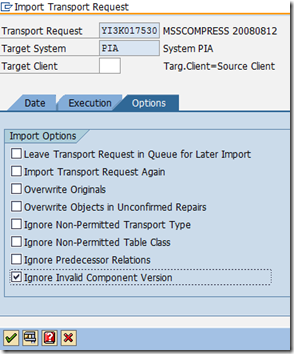
Assuming that the versions of the components are newer on the customer system, select this final option to override SAP and complete the import.
[To use in place of the text directly above when/if the associated Support article is again made available:
"Please refer to the following Support article: Importing Query or Transaction Function Module Transport error
WFM Installation Support Articles
Finding the Winshuttle Function Module version
How to check the Winshuttle Function Module Installation
Checking WFM installation logs (WIN-31805)
Winshuttle Function Module: Benefits
Authorization checks on the calls to self Remote Function Module (RFM) and standard RFMs under Virtual Forge profiler changes, as noted here:
- WFM RFMs self check : /WINSHTLQ/*
- LDB process via WFM : SDIFRUNTIME
- Orphaned Chunk clearing in WFM : SG
- Infoset SQ02, Queries SQ01 in WFM : AQCF
- Record in WFM : SBDR, SCP2
- Record ,User Format in WFM : RFC1, SU_USER
- Background Query run in WFM : BDL3, THFB
- Calculate prices BAPI call in WFM: WVK8
- Value help WFM (F4)
Vendor/Customer master functionality call via Direct in the WFM.
Authorizations for use if the WFM is not used:
- RFC access is still required
- TCode access is still required
- Scripts need to be Batch or GUI Scripting*
- Non-Batch scripts can only be created or used if developer authorizations are granted
- Authorizations list:
- OBJECT: ‘S_DEVELOP’
- OBJTYPE: ‘SCAT’, ‘ECSC’
- OBJNAME: ‘*’
- ACTVT: ‘16’ (=execute)
Authorizations as per Studio 11 pre-ship 3 WFM roles. These roles are also relevant for the non-WFM mode.
- /WINSHTLQ/CMN_ADMIN_ROLE (Winshuttle role for ADMIN)
- /WINSHTLQ/CMN_AUTHOR_ROLE (Winshuttle role for AUTHOR)
- /WINSHTLQ/CMN_RUNNER_ROLE (Winshuttle role for RUNNER)
Adaptive query throttling
- Checks dialog processes
- Check system resources
- Stop Explicitly Query Execution for an Un-optimized Query (Adaptive Query Throttling U.S. Patent No. 832144)
Chunking
- With WFM , Client Chunking can be used in which data extraction with chunks resulting in faster processing
- WFM uses Server-side Chunking. In this process, ABAP memory is utilized in compressed way, which results in processing of large data set without ABAP memory dump
Background processing
- With WFM , large query can execute as background work process (in "Background Mode")
- Saves dialog work processes
- Large query can be scheduled overnight
Query with t-code recording - Query can be created with underlined tables used behind any t-code. Expert knowledge is not required.
Query with Logical Databases - Query can be created for SAP Logical Database as well.
Transaction Validation
- For data with no Loops: Data is passed per row; the data is read and validated.
- For data in Loops:
- A single call per data set is passed from the RFC client to the FM
- The FM will make <n> recursive calls to the transaction code using the “call transaction” function until the list of items is exhausted
- The FM will deliver a single aggregated result of errors to the RFC client, thereby reducing the number of RFC calls and reducing latency
- Support for more than 10,000 line items
Comparison of validation times
Insert image from original Word doc here.
Transaction Simulation
- Certain transactions in SAP provide a simulate or whole document check option (typically financial documents)
- Script recordings cannot easily incorporate this feature
- Simulate will return messages that would typically only appear at the attempted commit of the data set
- Types of results detected with Simulate
- Balance checking on documents
- Input tax and tax on sales and purchases, are generated
- Profit & Cost Center checking
Document Attachment
- More options for Document Attachment
- Attachment can be saved to External Repository, saving SAP DB
- Requires FM configuration
- Covers GOS, BDS, DMS
- If the WFM is absent- then only BDS is supported
- Feature will be supported for all Tcodes that can be configured (for specific attachment method)
Add/Retrieve/Update long text
- An additional Long text option
- User can create and change the long texts
- User can read the existing long text
- Good length of long texts can be updated or read.
- Currently works with following important transactions:
1. FB02
2. FB03
3. ME22N
4. ME52N
5. MM02
6. VA02
7. XD02
8. XK02
9. BP
10. FK02
11. FK03
12. MK02
13. MK03
14. ME32K
15. VD02
16. FD02
17. VD02
18. IW32
19. IW32
20. IE02
21. IL02
22. IP02
23. AS02
24. KS02
25. ME12
26. CV02N
27. VA42
28. MM42
29. VA12
30. VA32
31. VA22
- Recording steps of long text is not required to update or read.
- Long text will only be updated if document changes get executed successfully
- Easy steps for long text read or update.
- Works with all SAP versions.
Skip Screen WFM-only functionality
- In one call from client, Skip Screen “if not found” functionality can be achieved through WFM
- Reducing the number of RFC calls from Client and hence reducing latency resulting in faster Execution
- Debug with Skip Screen is also supported for all t-codes except PA30/PA40
- Support available for “Read from SAP” functionality with skip screen
User administration control page
- A dedicated Winshuttle Custom T-code /n/WINSHTLQ/ADMPANEL to maintain all Winshuttle tables and tab pages for query authorizations, WFM admin parameters, and other options
- Provision to define Storage Category for a DMS attachment in Winshuttle Admin Panel, providing them feasibility to define external repository
- Easy to handle all Winshuttle parameters, as it uses SAPGUI
Vendor payment data handling
- Generation of Bank Details from IBAN & vice-versa
- Creation, Change & Deletion of IBAN/Bank data for mentioned Vendor
- Creation of New bank on user selection
- Check for Bank Master data
- fHave also been made compatible with Transaction code BP on releases S/4 HANA 1610 onwards
Customer master features
- Add/Delete partner functions
- Email ID insert or delete in customer
- IBAN create/Delete
- Replace/Add bank to given IBAN
- Delete bank for given customer
- Bank creation
- Update the tax classifications of customer
- Functionality to update Sales Data and Tax Classification with the same script
- Have also been made compatible with Transaction code BP on releases S/4 HANA 1610 onwards
What’s happening behind the scenes
- Asynchronous processes
- Improved Run performance
- Plug-and-play architecture
- More than 10% throughput performance improvement
Changes with SAP S/4HANA for Extended Material Number
- With SAP S/4HANA, the maximum length for Material Number was extended from 18 to 40 characters.
- All external interfaces (BAPIs, IDOCs, RFCs) containing Material Number still have the usual technical field MATNR with length 18. This is for compatibility reasons.
- These interfaces have been enhanced by a new field: MATNR_LONG.
Changes to accommodate Customer and Vendor master into one new transaction called BP
- Customer/Vendor masters have now been replaced by Business Partner (i.e. a common t-code, BP)
- All Customer/Vendor related t-codes are obsolete. These include XD01/XD02/XD03, XK01/XK02/XK03, FD01/FD02/FD03, etc.
SAP certified for S/4 HANA 1610, 1709, and 1809
Winshuttle Tested for S/4 HANA 1610, 1709, and 1809
Feasibility to give Multiple Currency and/or CO-PA values into linear rather than hierarchical structure
Purchase Requisition Number updating in Studio Logs after ME51N run
Support for WHERE criteria on Right Tables with Left Outer Join
Query Support with SAP Logon Group based Load Balancing
Supported across all ERP, S/4 HANA and Non-ERP (BASIS releases 700 and above)
Detailed SAP Traces
Support of all Winshuttle features on SAP EHP7/EHP8 environments as well
Winshuttle Memory Management to avoid system runtime errors during large Transaction/Query execution
The installation information below was accurate prior to 11-19-18.
Winshuttle Function Module: Installation
Customers who cannot record or run NON-BATCH Transaction scripts on a given SAP system may not be able to call SAP transactions over RFC without one of the following:
RECOMMENDED:
- Installation of Winshuttle Function Module
(Not recommended, in order of preference)
- Elevated SAP Access: Auth object S_DEVELOP, activity 16, object name *, and object type SCAT
- ECATT/CATT enabled on specific SAP server
- Removal of the authorization check that was inserted by SAP
Winshuttle function module is required when:
SAP ECC 6 Enhancement Pack 4 and above (SAP BASIS 700 Support Package 24 and above) have been installed on the client environment.
The link below provides the patch levels affected:
The function module is installed on the SAP Server and normally the Basis team move the function module to the SAP server via SPAM/SAINT. Complete instructions are included in the Winshuttle Function Module installation files.
To facilitate over 1,300 Winshuttle customer installations to continue running existing Winshuttle scripts against their productive SAP systems, a Winshuttle Function Module effectively replicates the capabilities of the legacy SAP function module components that were changed by SAP.
This approach does not detract from the customer's system integrity or security model, nor does it represent any added vulnerability to a given SAP system beyond the state prior to the application of the SAP support package.
Winshuttle Functional Module 10.6 contains both the Transaction Function Module and the Query Function Module. Previous versions before 10.5 have separate Function Modules for Transaction and Query.
The function modules have been SAP Certified as of 10.5 for Query and Transaction and the Winshuttle Function Module as of 10.6.
The sections below are relevant if you have previously installed a Transaction or Query Function Module.
Checking Function Module installation
SAP Transaction Code SAINT
- Execute SAINT.
- Select the proper Winshuttle Add-on/PCS.
- Scroll to the right to the OCS package data.
- Copy SAPK-xxxx.

- Click Go-To > Import Logs > Single Package.

- Paste the SAPK-xxxx value.

- Execute.

- Confirm that the transport(s) were successfully imported.

Importing Query or Transaction Function Module transport error
While applying any Winshuttle transport to their system, user is getting the following error: "X of X requests do not match the component version of the target system."

Re-run the import with the following option(s) selected:
- Leave Transport Request in Queue
- Import Transport Request Again
- Ignore Invalid Component Version

Assuming that the versions of the components are newer on the customer system, select this final option to override SAP and complete the import.
Finding the Winshuttle Query Function Module version
Occasionally, users and administrators will need to find the Winshuttle Function Module version number, so that they can determine whether an upgrade is needed. The version of Query should match the version of the Winshuttle Query Function Module.
- Log on to the SAP system.
- Go to transaction code SE37, enter the function module name /WINSHTLQ/QRE_RFC_GETVER, and click Display.

- Click the Source code tab and look at the EXPAPPVER to see the version.
for example, 10300 means version 10.3.
Transport between releases 7.00, 7.01, 7.02 and 7.3
For transports between related Basis releases, there are no issues. This applies to transport between releases 7.00, 7.01, 7.02 and 7.3